


City Brawl
played 1145 times158
Share game
Discover something different


More to mix

Sprunki
Sprunki Phase 3
Joy Garden
Sprunki Phase 4
Sprunked
Sprunki Wenda’s Dimension
Sprunki Phase 5
Sprunki Retake

Sprunki - Hyper Shifted Phase 3 Remastered
Sprunki Phase 7 Remastered
Sprunki Phase 8
Saving Funbot from Lava

Sprunki Double Date
Sprunki Mustard
Sprunki Mother’s Nature Port
Sprunki Wenda Treatment

Sprunkin
Sprunki Kiss Mod
Sprunki Phase 9

Sprunki Sad Mod
Sprunke Phase 4 Remastered Remake New Update
Meccha Chameleon
Sprunki Phase 11
Sprunki OC Real










Overview of City Brawl
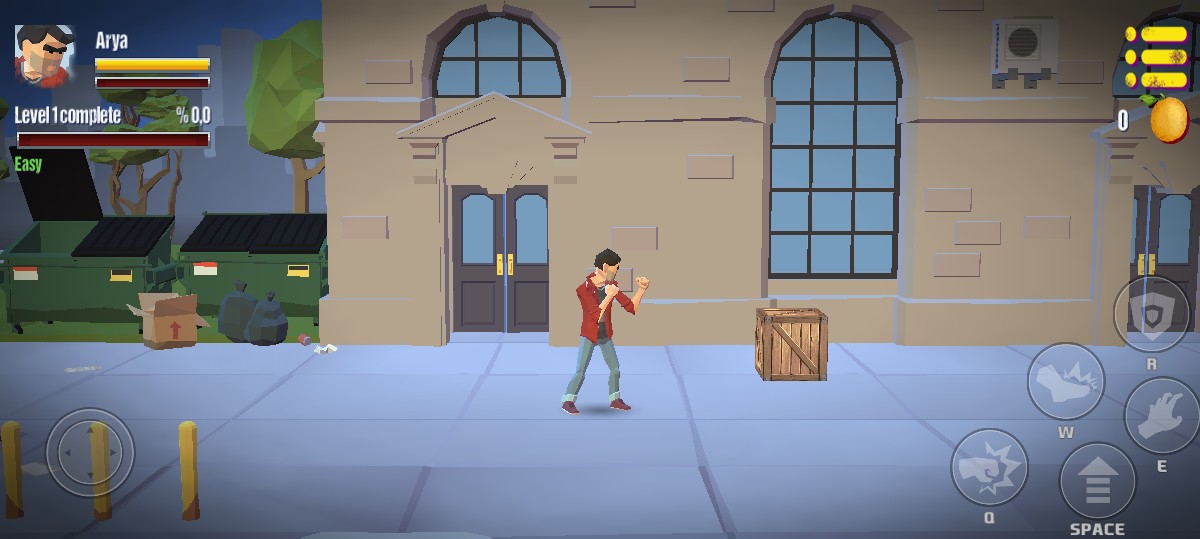
Players must use timing, agility, and cunning attacks to survive in the hectic street battles of City Brawl. You take on the role of a lone warrior who must vanquish approaching gangs, gather fruits to enhance abilities, and unlock more powerful heroes. As you advance through the game, the stakes increase with daily challenges and more formidable opponents.
What Is City Brawl?
City Brawl is a casual action-fighting game where players battle through waves of enemies using martial arts-inspired moves, combos, and special abilities.
It is a beat 'em up/street fighting game that combines straightforward controls with brawler-style fighting, character development, and upgrade mechanics.
How to Play City Brawl
City Brawl Gameplay Overview
The gameplay focuses on fast, dynamic street combat:
- Enemies rush in from all directions.
- Each character has unique punch and kick strengths.
- Special moves can knock down multiple enemies at once.
- The goal of each level is to survive the wave, defeat all enemies, and collect rewards.
- Better timing, dodging, and higher stats are necessary when facing boss enemies.
- The game keeps each level interesting and difficult by introducing stronger gangs, faster attacks, and more powerful waves as you level up.
An Overview of Keyboard and Mouse Controls
Here's a quick rundown of the controls for City Brawl on PC:
Controls with a mouse
- Left-click: Use kicks and punches to attack
- Move the cursor to position your fighter and select the direction of attack.
- If there is a special skill icon, click it: Turn on special attacks
Keyboard Controls
- Arrow keys or WASD: Move your fighter left and right
- Spacebar: Standard attack
- Shift or E: Activate special ability (varies by character)
- Esc: Pause the game
- Combining both—using the keyboard for movement and the mouse for quick attacks—often gives the best control experience.
Tips to Win in City Brawl
Here are some practical strategies to help you dominate every level:
- Keep Moving: Standing still makes you an easy target. Move constantly to avoid being surrounded.
- Attack from Safe Angles: Try to hit enemies approaching from one side at a time instead of getting stuck between two groups.
- Upgrade Your Fighter Early: To deal with more difficult waves sooner, spend fruits on important stats like damage and health.
- Hold off on Using Special Attacks on Crowds: Use your special moves to deal a lot of damage during boss battles or when several enemies charge in.
- Unlock More Powerful Characters: Later stages are made easier by certain characters' greater attack range and base power.
- Keep an eye on enemy trends: Bosses and gangs move in predictable ways. To effectively avoid blows, learn their timing.
Similar Games You Might Enjoy
- Granny: A survival horror escape game where you must solve puzzles and hide from Granny as you try to escape her eerie house.
- Geometry Dash SubZero: A fast-paced rhythm-based platformer where you jump through obstacle-filled levels synchronized to energetic electronic music.